How to prompt Claude for motion graphics
Write a motion brief that covers the result you want, how it unfolds, and what you need delivered. Start with a simple loop, then add UI states, scene changes, or music when the project needs them.
Write a brief the assistant can act on
A motion graphics prompt is a set of creative and technical instructions. Include what changes the outcome. A short animation may fit in a paragraph; a longer sequence benefits from named sections.
- Goal and inputs
- State the use, audience, message, and available assets. Supply exact text, data, and logos where needed. Ask for missing essentials; if everything is supplied, the assistant can proceed.
- Visual and motion direction
- Describe layout, type, colors, and what leads the eye. Name the motion: a gentle sine-wave drift, a cubic ease-out arrival, or a spring with little overshoot. Specify unwanted effects, such as particle bursts, when they would change the look.
- Sequence and timing
- List what appears first, what changes next, and how the piece ends. Give scenes or states time to read. For a loop, describe the return to the opening; for music, map actions to measured beats.
- Implementation and delivery
- Choose dimensions and aspect ratio for the destination. Specify HTML, SVG, Canvas, or React only when you have a reason to prefer it. State allowed dependencies, editable values, reduced-motion behavior, and whether you need source, video, or both.
- Checks and known pitfalls
- Turn likely failures into checks: text must fit the safe area, outgoing and incoming labels must not overlap, and a seamless loop must return to the same visual state and motion. Add asset rights and audio checks when relevant.
- First action and approval
- Tell the assistant what to do next. A small loop can go straight to code. For a complicated piece, ask it to collect inputs, show a storyboard or timing table, and wait for approval before implementation.
Start with a short loop
This practice brief borrows the visual idea of our Make it move study. It is a new teaching example, not the original prompt or a tested recipe for an identical result. Its dimensions and six-second duration are choices for this exercise.
Goal: Create a silent typography loop for a product announcement.
Direction: Put MAKE above IT MOVE. on a lime background (#c9f269), with dark olive text (#202c18). Keep both lines readable; avoid glow and particles.
Timing: Use a six-second loop. Shift the second line gently left and right and rotate a twelve-spoke asterisk once per loop. Keep the first line still.
Delivery: One complete HTML file with responsive SVG, a 960 × 600 viewBox, system fonts, and no external assets. Include a static reduced-motion view.
Review: Check text at a narrow width and the join between loops.
Start: If anything essential is missing, ask me. Otherwise write the HTML and explain how to preview it.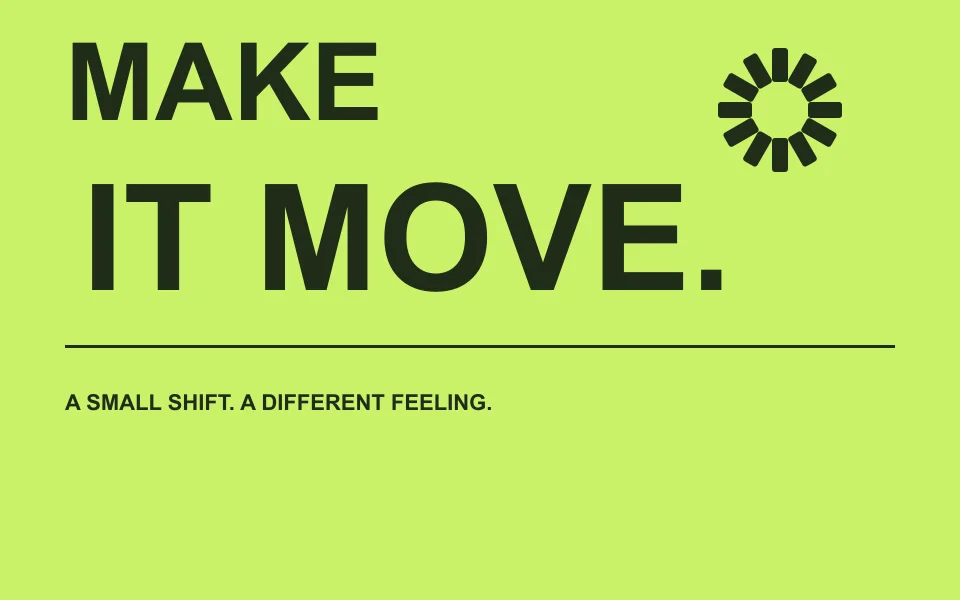 Compare with Make it move and its original prompt
Plan states, scenes, and transitions
Words such as smooth or dynamic leave most of the sequence undecided. Write the order first, then the duration and transition for each change.
- Give each state a purpose: show a button, acknowledge a click, then confirm completion. For multiple scenes, state the message and framing of each shot.
- Describe what persists between states. One rounded rectangle can keep its identity while its width, corner radius, and content change. A hard cut is also a valid choice when the story calls for it.
- For music-led motion, supply the track and a verified beat grid. BPM alone does not identify the first downbeat. Decide which beats trigger changes and where the viewer gets time to read.
- 0 to 2 sHold a button long enough to read it, then show a cursor click.
- 2 to 4 sMorph the same container into a progress indicator, then a check mark.
- 4 to 6 sLet the confirmation settle, then return the shape and cursor to the opening state with matching motion.
For a multi-scene promo, use the same timing table with a row for each scene. Include the transition and outgoing text timing, not just the next image. Confirm the plan before adding detailed effects.
Read a structured community prompt
One shape, many states, by zero (@twoclipping), describes a continuous UI sequence using six tagged sections. The tags separate different jobs within the brief. They are the author's organization choices; headings or other descriptive names can serve the same purpose.
Read zero's full prompt and view the original post<inputs>- Requests 8 to 12 UI states, a palette, and a music track. This makes the brief reusable: the assistant gathers the variables before deciding the sequence.
<direction>- Keeps one shape on screen as it becomes different controls. It describes cursor actions, camera framing, type, spring feel, and banned effects, giving the sequence a consistent visual direction.
<structure>- Lists the order from button to player, slider, tabs, chart, command palette, and toast. It calls for 120 BPM over seven bars, with an event on each beat. A state list becomes a timed sequence when mapped to the chosen track.
<build>- Requests a 1440 × 1440 HTML composition, a pure seek(t) function, closed-form springs, cursor-driven drags, audio analysis, and a Playwright/ffmpeg render. It also asks for one preview frame per beat before the full render.
<gotchas>- Names failures to watch for: blurry scaled text, overlapping labels during morphs, and a loop join with mismatched cursor position or speed. These become concrete acceptance checks.
<start>- Asks for inputs first, followed by the state list on a beat grid before any code. The first response should be questions and a plan, rather than a finished animation.
Reuse the separation of inputs, direction, sequence, implementation, and review. Choose your own palette, font, duration, and effects. The square frame, seven bars, and restrictions on gradients belong to this brief. A community example does not grant reuse rights to its video, music, or brands.
Choose tools for the result you need
Simple browser loops and frame-by-frame video production have different requirements. Agree on the output and available tools before asking an assistant to build the pipeline.
Use a repeatable timeline when frames must be reproducible
For seeking or offline rendering, ask for seek(t): the same timestamp must produce the same frame regardless of playback history. Compute styles from time; control randomness and asset loading too. For a simple live preview, CSS animation or requestAnimationFrame can be enough. Use elapsed time rather than frame counts, and decide whether a hidden tab should pause or catch up.
Match the motion math to the behavior
A sine wave suits repeated drift; cubic ease-out suits an arrival. The community prompt uses closed-form spring responses so each state can be evaluated at any timestamp, and different springs on each edge to create stretch. In a drag sequence, define the value from the cursor while held, then the release response from that position. Use these details when the motion calls for them.
Give sound its own preparation step
Confirm the track's license for your use, then provide the audio file. The example asks for Python and NumPy analysis to find a beat grid and align sound peaks. That requires a coding environment with file access and audio tooling. If those tools are unavailable, supply measured timestamps yourself or make a silent version; do not invent a beat analysis.
Separate previewing from rendering a video
The example requests Playwright frame capture and ffmpeg blending of four subframes into each output frame at 60 fps. This is an offline workflow requiring those tools, a loaded composition, and a repeatable timeline. Inspect representative frames before the full render, then encode and combine audio as needed. Writing a prompt does not install or run that toolchain.
Screen recording is another option, but it captures live playback and needs a quality check. WebCodecs can encode frames in a supported browser; a video export also needs container muxing and an implemented capture pipeline. Prompt Motion currently supplies reference MP4s for original studies, not custom video rendering.
A reusable motion graphics prompt template
Replace every bracketed field and remove sections that do not apply. Use this as a project brief in your chat or coding environment. The tags organize instructions; they do not guarantee correct code or identical results across models.
<goal>
Create [a loop, UI sequence, or multi-scene animation] for [audience and destination]. Communicate [one main message].
</goal>
<inputs>
Use these exact words, data, and assets: [supply them].
Canvas: [width × height and aspect ratio]. Duration: [seconds].
Audio: [none, or a licensed track with measured beat timestamps].
Ask for essential missing inputs. Do not invent brand assets, data, or audio analysis.
</inputs>
<direction>
Layout and type: [hierarchy, font, and safe area].
Palette: [hex values and their roles].
Motion: [direction, speed, easing, and what stays anchored].
Avoid: [specific effects that conflict with the brief].
</direction>
<timeline>
[Time range or beats]: [state or scene, action, and transition].
[Next range]: [next action, with time to read].
Ending: [hold, cut, or return to the opening with matching position and motion].
</timeline>
<build>
Deliver [HTML, SVG, Canvas, or React source; video if required].
Allowed dependencies and tools: [list what is available].
Keep [text, palette, data, and timing] editable. Include a reduced-motion state for browser playback.
If seeking or offline rendering is required, compute each frame from time with seek(t), without depending on earlier frames.
If video is required, specify [dimensions, frame rate, format, and audio] and agree on the capture and encoding tools before rendering.
</build>
<review>
Check text fit, contrast, state transitions, missing assets, and timing.
For loops, check the join, including cursor position and motion.
For audio, verify sync. For video, inspect sample frames and the exported file.
</review>
<start>
If inputs are complete, [implement this simple loop, or show a timeline and wait for my approval]. Otherwise ask for what is missing.
</start>
If all inputs and the sequence are already agreed, remove the approval step. For a basic browser loop, you can also remove the audio, seeking, and video-render instructions. Keep the constraints the project actually needs.
Review the result and ask for specific changes
- Read every label at the intended display size and at a narrow browser width. Check contrast, line breaks, and safe margins. Replace illustrative data and fictional copy.
- Watch each transition. Check outgoing text, incoming text, cursor actions, and whether the viewer has enough time to understand each state.
- Play several cycles. For a seamless loop, compare the opening and closing states and the motion across the join. Test that the reduced-motion view still communicates the message.
- Open the delivered source and exported file. Confirm dimensions, duration, frame rate, audio sync, and asset rights where applicable. Editing HTML does not update an existing MP4.
Describe the timestamp, visible problem, and desired change. State what should stay unchanged so the assistant can make a focused revision.
At 2.4 seconds, the outgoing button label overlaps the progress value. Fade the label out before the value appears. Keep the container path, palette, and six-second duration unchanged. Show that transition again before rendering the whole loop.
Practice with an original study
These Prompt Motion studies include their prompts, editable HTML, and silent MP4 references under CC0 1.0. Use the source as a reference implementation. Exact reproduction from the prompts with a model has not been tested.